
Skip to content
qikfox

qikfox Safe Browser

Browse with protection working around you

qikfox Safe Browser is a full web browser for desktop and mobile. It renders the modern web like any other browser, and adds safety, security and privacy controls in one place instead of spreading them across nested menus.

What it is
A web browser for everyday use
Platforms
Windows, macOS, Linux, Android, iOS
Price
Free to download
Works with
qikfox Search, Antivirus and VPN
01WebBrowser

qikfox Safe Browser

Browse with protection working around you.

qikfox Safe Browser is an AI-first desktop and mobile browser designed to make the internet safer, smarter, and easier to navigate. It brings AI into the everyday browsing experience while serving as the foundation that connects the broader qikfox family of safety, security, privacy, and productivity products.
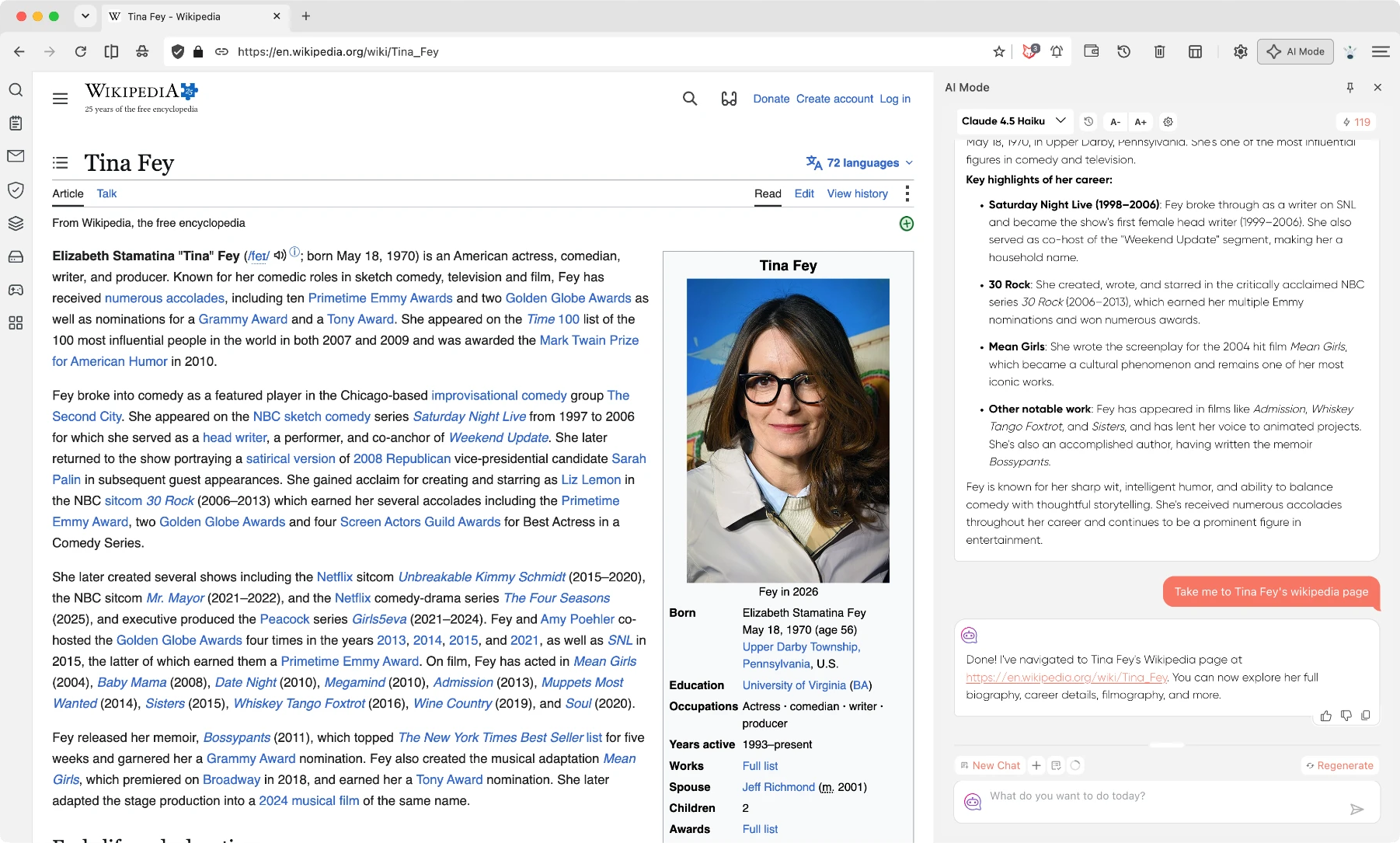
qikfox Safe Browser showing a Wikipedia article beside the AI Mode assistant panel

What it covers

  • Avoid a vendor lock-in, bring your own LLM or use the built in AI with qikfox AI Assistant
  • All requests are scrubbed for privacy by the browser giving you unparalleled privacy from AI operators
  • AI Assisted Web Browsing keeps you safe while browsing
  • Comes with numerous productivity apps like Antivirus, Notes, Stacks
  • Active link and promptware protection
Available on
Windows · macOS · Linux · Android · iOS

The browser in use

qikfox
Browser

Safety

Safety: catching the moment before a mistake

Most harm online comes from a single ordinary decision: opening a link, trusting a page, running a file. The browser's safety features exist to interrupt those moments with information rather than jargon.

The detail lives on the browser safety features page, and the wider approach is described under safety at qikfox.

What the browser watches for

  • Deceptive pages

    Sites imitating a bank, retailer or delivery service

  • Unsafe downloads

    Files handed to qikfox Antivirus when it is installed

  • Insecure connections

    Encrypted connections preferred where a site supports them

Security

Security: the software itself

A browser is a large piece of software that runs untrusted code from strangers all day, so keeping it patched matters as much as any feature. qikfox Safe Browser updates through its own channel and separates page content from the browser around it.

Read more about security at qikfox or report an issue through the Security Center.

Security practices

  • Regular updates

    Security fixes shipped through the normal update channel

  • Isolated page content

    Web content kept separate from the rest of the browser

  • Responsible disclosure

    A defined route for researchers to report issues

Privacy

Privacy: fewer assumptions about you

Privacy in a browser is mostly about defaults and clarity: what is stored on your device, what leaves it, and how easily you can change either. We describe those in the privacy documentation rather than in a slogan.

See the qikfox privacy approach and the privacy policy.

Privacy controls

  • Tracking controls

    Settings for cross-site tracking, in one panel

  • Clear history controls

    What is stored locally, and how to remove it

  • Documented collection

    What the browser sends, written on the privacy page

Features

Major browser features

The features below are the ones people use most. Anything not yet published is described on the release notes page rather than promised here.

Protection panel

One place for safety, security and privacy settings, with plain descriptions of what each does.

Site information

Connection status, permissions and safety context for the page you are on.

Download review

Files are handed to qikfox Antivirus for review when it is installed on the device.

Tab management

Standard tabs, windows and pinning, with fast switching on desktop and mobile.

Sync across devices

Bring settings and open tabs to your other devices when you sign in.

Search integration

qikfox Search is available in the address bar, and other search engines can be selected.

VPN status

When qikfox VPN is active, the browser reflects the encrypted connection.

Reader-friendly defaults

Readable text sizing and reduced-motion support out of the box.

Extension support

Support for common browser extensions on desktop builds.

Download

Get qikfox Safe Browser

Choose your platform. Each download page lists what the build includes and its system requirements.

How the browser compares to the rest of the qikfox family

This table compares what each qikfox product protects. It does not compare qikfox to other companies' products, because we do not publish test data we have not produced.

Coverage by qikfox product. Source: qikfox product documentation.
CapabilitySafe BrowserAntivirusVPN
Web pages you openYesFiles onlyConnection only
Files you downloadHanded for reviewYesNo
Applications on the deviceNoYesNo
Traffic outside the browserNoNoYes
Your IP addressNoNoReplaced by a qikfox server address

System requirements

Windows

Windows 10 or Windows 11, 64-bit. 4 GB RAM and 500 MB free disk space.

macOS

macOS 12 or later, Apple silicon or Intel. 4 GB RAM and 500 MB free disk space.

Linux

Debian, Ubuntu and Fedora builds. 64-bit, 4 GB RAM.

Android

Android 9 or later.

iOS

iOS 16 or later, iPhone and iPad.

Updates

Automatic updates through the qikfox update channel or your app store.

Exact minimum versions per build are listed on each platform download page.

Why the browser is the centre of the product family

The browser is where most consequential online decisions happen: signing in, paying, downloading, granting permissions. qikfox Safe Browser therefore carries the largest share of protection, with every control on one screen, defaults set to protected, and warnings that name what was detected instead of simply declaring danger.

Defaults decide what most people experience

A protection feature that must be discovered and enabled protects the small number of people who go looking for it. The measure that matters is what protects someone who never opens settings at all, so qikfox ships with cross-site tracking protection, page checks and download review already on.

That has a cost we accept and state: stricter defaults occasionally change how a site behaves. Where a control carries that trade-off, the protection panel says so in the same place you would change it, so a broken checkout has a visible explanation rather than a mystery.

Warnings are written to be read

An unexplained warning trains dismissal. Ours name the category that triggered the interruption, describe what usually happens on such pages, put the safe route first, and admit that detection can misfire. Continuing is possible where it is reasonable, as a deliberate second action.

This is also why we avoid shields, scores and percentages in the interface. They imply completeness, and the moment something slips through, a score turns a limit into a betrayal.

Where the browser hands over

A browser sees pages, not the device. Files that land on disk are qikfox Antivirus territory; the network path is qikfox VPN's. Each product works alone, and the handovers are the reason they are worth having together - a download flagged by the browser is reviewed by the scanner rather than left to the person to judge.

Frequently asked questions

Yes. The browser is free to download on all supported platforms.

Related qikfox pages

Download qikfox Safe Browser

Free on Windows, macOS, Linux, Android and iOS. Import your bookmarks in a couple of minutes.